
Monitor and Manage 404 Errors Without the Hassle
Automatically detect and log broken page requests across your website. Track 404 errors in real time, understand where they come from, and quickly create redirects to protect user experience and SEO performance.
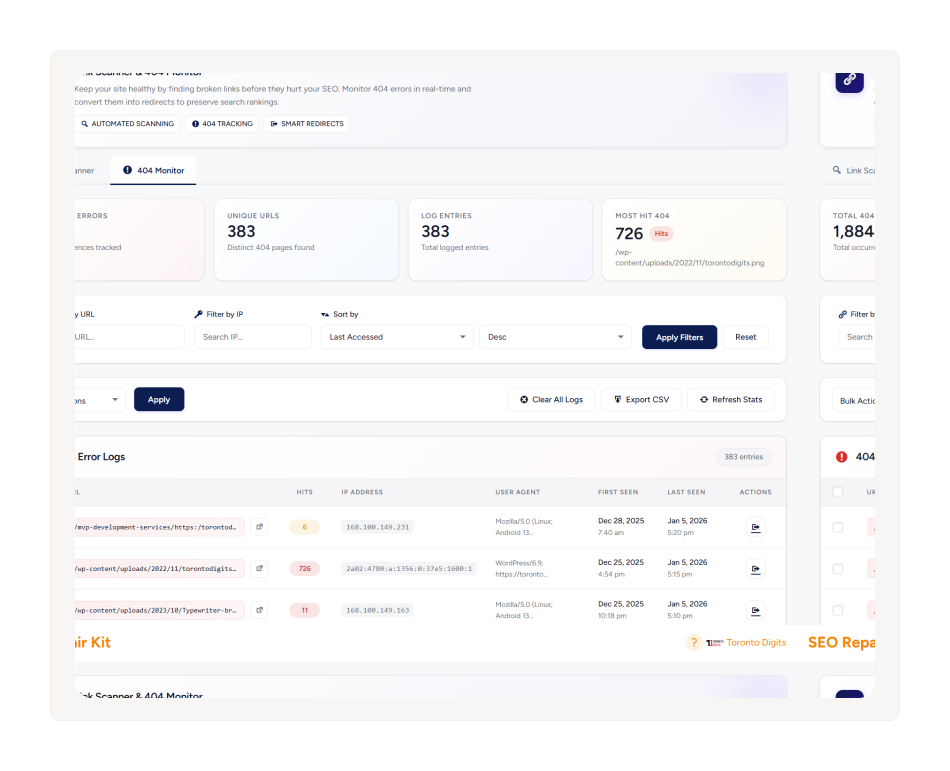
What is 404 Error Tracking?
404 Error Tracking continuously monitors your website for missing pages and broken requests. It records detailed information about each error—such as the source page, visitor details, and request path—so you can quickly identify issues and resolve them before they affect users or search engine crawling.

Real-Time 404 Detection
Instantly detect when visitors or bots encounter missing pages on your site, allowing you to respond quickly before errors impact user experience.

Detailed Error Logging
Every 404 error is logged with important details, including the referrer URL, user agent, and IP address, to help you trace the source of the issue.

Error Analytics & Reporting
Analyze patterns in your 404 errors to understand which pages or links are causing problems and prioritize fixes effectively.

Quick Redirect Creation
Create redirects directly from the error logs to guide visitors to the correct pages and recover lost traffic.
How 404 Error Tracking Works
Automatically detects missing pages, logs detailed error data, and helps you quickly analyze and fix broken links to maintain a smooth user experience.

Step 01
Detect
The system continuously monitors your website and automatically detects when a visitor reaches a missing page.

Step 02
Log
Each error is recorded with detailed information, including the request URL, referrer, user agent, and IP address.

Step 03
Analyze
Review collected data to identify broken links, outdated URLs, or navigation issues affecting your site.

Step 04
Fix
Create redirects or update links to ensure visitors are directed to the correct content.
Why Businesses Choose 404 Error Tracking
Stay in control of your website’s link health and protect your SEO performance with automated monitoring and fast issue resolution.

Protect SEO Performance
Broken pages can harm your site’s crawlability and indexing by search engines.
Detecting and fixing them early ensures your search visibility stays intact.

Better User Experience
Visitors dislike encountering broken pages, which can reduce engagement.
Promptly addressing errors keeps navigation smooth and frustration-free.

Centralized Error Monitoring
All detected 404 errors are displayed in a single dashboard for easy access.
This allows you to quickly prioritize and troubleshoot problem areas.

Faster Issue Resolution
Detailed logs with referrer, user agent, and IP information simplify debugging.Quick redirect tools help resolve errors before they negatively impact traffic.

Comprehensive Tracking Insights
Track patterns and recurring errors to prevent future broken links.
Analytics provide actionable data to continuously improve website reliability.
How 404 Error Compares
See how 404 Error Tracking outperforms popular SEO plugins in detecting, monitoring, and fixing broken links efficiently.
| Feature | 404 Error Tracking | Rank Math | Yoast SEO | All in One SEO |
|---|---|---|---|---|
| Broken Link Detection | ✓ | ✓ | ✕ | ✕ |
| Internal & External Scanning | ✓ | Limited | ✕ | ✕ |
| Real-Time HTTP Check | ✓ | ✕ | ✕ | ✕ |
| Scheduled Scans | ✓ | Limited | ✕ | ✕ |
| CSV Export / Logs | ✓ | Limited | ✕ | ✕ |
| Direct Edit & Redirect | ✓ | ✓ | Limited | Limited |