
Manage URL Changes Without Losing SEO Value
301 Redirects in SEO Repair Kit ensure that when your URLs change, your SEO performance stays intact. Easily create and manage redirects that preserve link equity, maintain rankings, and guide visitors to the correct pages without interruption.
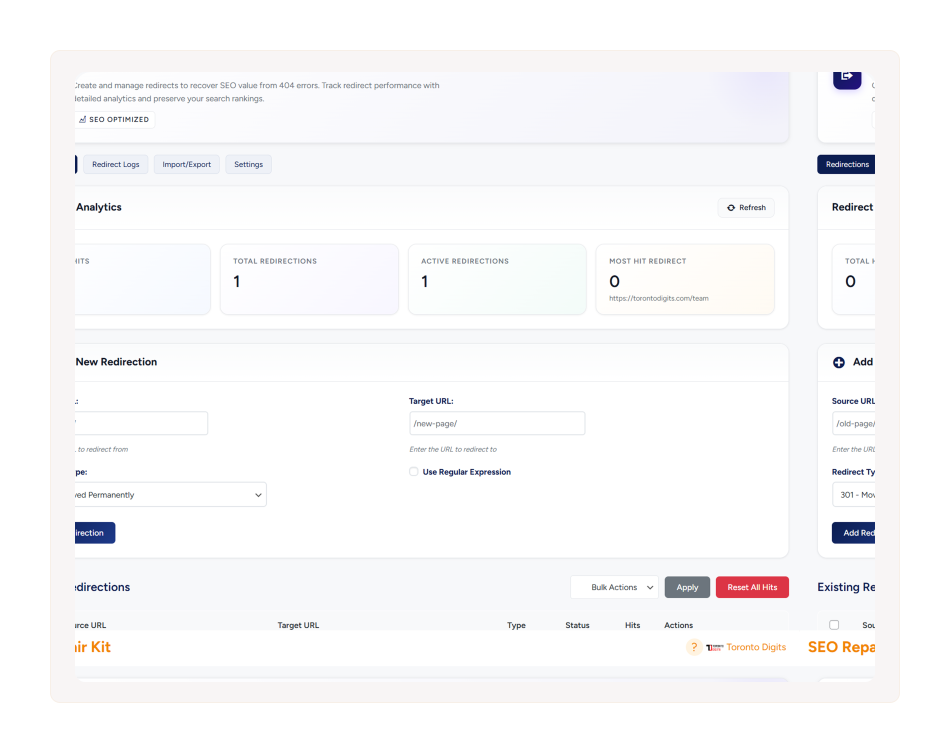
What are 301 Redirects?
301 Redirects automatically guide users and search engines to the correct pages, preserving SEO and rankings.

URL Redirect Management
Create and manage redirects for outdated or changed URLs from a simple dashboard.

Redirect Performance Tracking
Monitor redirect hits and analyze which redirects are used most frequently.

Flexible Redirect Types
Create both 301 (permanent) and 302 (temporary) redirects based on your needs.

Advanced Redirect Rules
Use regex patterns and position-based ordering to handle complex redirect scenarios efficiently.
How 301 Redirects Work
Easily create and manage redirects to guide users and search engines from old URLs to the right pages, preserving SEO and ensuring smooth navigation.

Step 01
Create Redirect
Add the old URL and the destination URL you want visitors and search engines to reach.

Step 02
Configure Settings
Choose the redirect type (301 or 302), apply regex rules if needed, and set redirect order.

Step 03
Activate Redirect
Enable the redirect and let the system automatically guide users and search engines.

Step 04
Monitor Performance
Track redirect hits and identify the most used redirects through built-in analytics.
Why Businesses Choose 301 Redirects
Keep your website traffic flowing and protect SEO value by automatically guiding users and search engines to the correct URLs when pages change.

Preserve SEO Value
Maintain valuable link equity and protect your search engine rankings when URLs change. Redirect old links to the correct pages so your SEO performance remains stable.

Prevent Broken Links
Avoid frustrating dead ends by automatically redirecting outdated or removed URLs.
Ensure visitors and search engines always land on the right page.

No Coding Required
Create, edit, and manage redirects through an easy-to-use interface.
No need to modify server files or write technical redirect rules.

Easy Site Updates
Make website updates, content restructuring, or migrations without worrying about lost traffic. Redirects ensure a smooth transition for both users and search engines.

Smarter Redirect Insights
Monitor redirect hits and discover which URLs receive the most traffic. Use performance insights to optimize and manage your redirects more effectively.
How 301 Redirection compares
301 Redirection provides complete redirect management with tracking and advanced controls.
| Feature | 301 Redirection | Rank Math | Yoast | All in One SEO |
|---|---|---|---|---|
| Easy 301 Redirect Setup | ✓ | ✓ | PREMIUM | ✓ |
| Automatic Redirect Suggestions | ✓ | LIMITED | ✕ | ✕ |
| Regex & Advanced Redirect Rules | ✓ | PREMIUM | ✕ | ✕ |
| Import / Export Redirects (CSV) | ✓ | ✓ | ✕ | LIMITED |
| Redirect Hit Tracking & Analytics | ✓ | LIMITED | ✕ | ✕ |
| Auto Redirect for Deleted Pages | ✓ | LIMITED | ✕ | ✕ |
| Loop & Chain Redirect Detection | ✓ | ✕ | ✕ | ✕ |
| 404 Error Redirect Automation | ✓ | LIMITED | ✕ | LIMITED |
| No Coding Required | ✓ | ✓ | ✓ | ✓ |
Keep Your Website SEO-Safe During URL Changes
Create and manage redirects easily while preserving rankings, traffic, and user experience.